

This article is part of a blog series about building BananaBot, a physical AI that plays Bananagrams on a real table:
Part 1. Why I’m teaching an AI to play Bananagrams - What physical AI and digital twins are, what BananaBot is, and the NVIDIA stack we will be using to build it.
Part 2. Frames from a video stream - (this article) - Training the bot’s eyes on still photos from the live feed, and why two small classic machine learning models beat the big AI models at perception.
Part 3. A full game with no camera at all - The simulator that emits exactly the frames as the DeepStream pipeline, so the bot could play, solve and talk while the camera is still unavailable.
Part 4. Giving it a voice - The voice agent using Pipecat: how it listens, thinks, and speaks, and how it controls and monitors the game through voice instructions.
Part 5. Running the DeepStream pipeline for real - How the camera pipeline came together on the Spark, and what the bot saw the first time it looked at a real table.
Part 6. BananaBot plays at the family table, and what comes next - A full game with everything working together, and plan how we can use Nvidia Isaac Sim for later experiments.
Hi friends,
In the last post I trained a letter classifier on still iPhone photos, and it scored 99.1% on its test set. Then I pointed the real 4K camera at the tiles at the table, and the very same model scored 11%. What a way for a model to fall over!
In this post we will look at what that gap actually was, and how we closed it. Spoiler: we did not need a bigger model. We needed the right frames, and a fair amount of pre-processing.
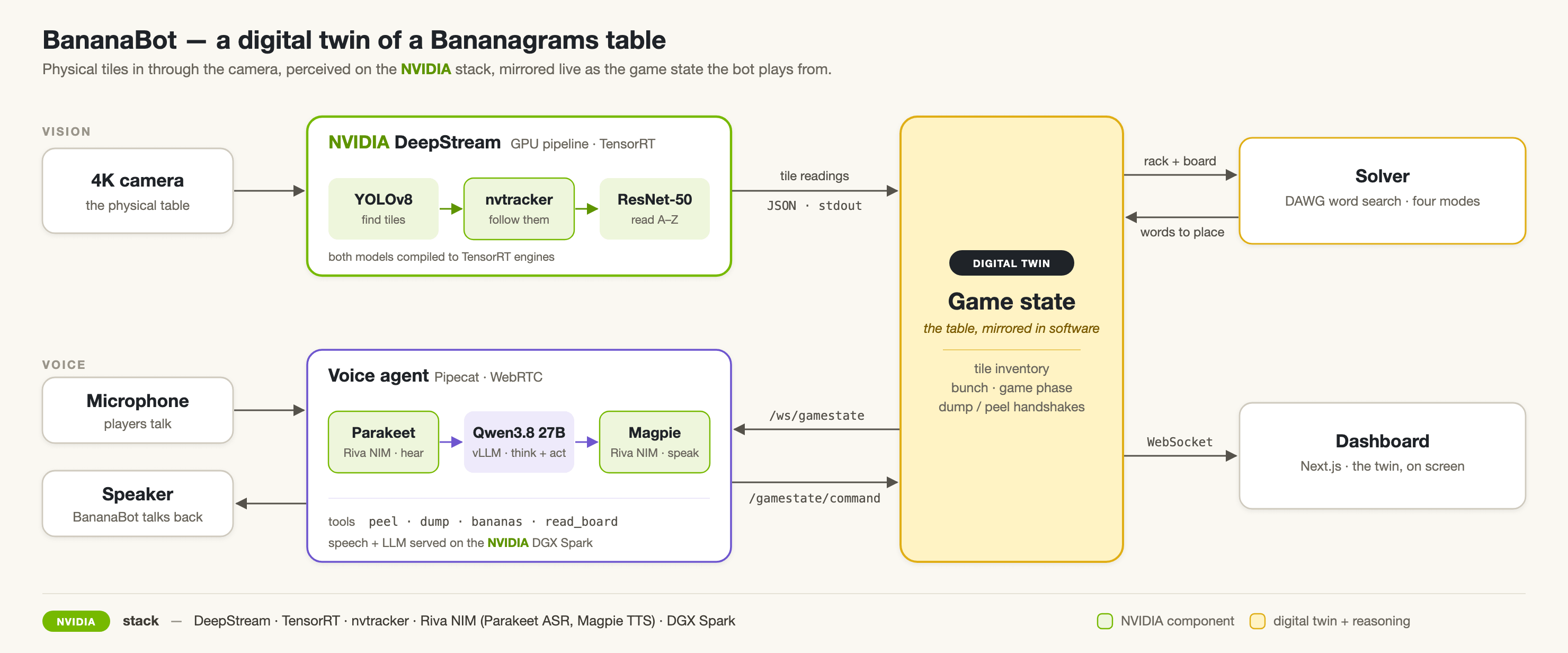
The frames will be consumed by NVIDIA DeepStream, a GPU video analytics pipeline that reads the camera, runs the models, and emits a JSON reading of every tile on the table. If you have not come across it, it is the piece of the stack that makes all of this run on a GPU at 30 fps.
This is part two of the BananaBot series. Part one, why I’m teaching an AI to play Bananagrams, was about what physical AI and digital twins are, and the NVIDIA stack we will be using to build it.
The dataset is a video
The camera watches the tiles, and for every frame it captures, we need to know which letter is on every tile. When I started this, I trained a classifier on still iPhone photos of tiles on a wood table, and it scored 99.1%.
In a game the camera is a 4K webcam streaming 16 frames a second over USB, in MJPG, fixed above the table. That is a very different image from the iPhone photos, however, it is the image the model will actually see.
So the training set is not a pile of photos. It is a pile of frames from the live stream, taken the same way the camera streams in play. We then annotate these frames, and use them to train the perception models that will run on the live video stream.
Capturing frames, and not still photos
To capture, I built a small tool: a web page that keeps the camera on the Spark streaming at its full 30 fps game resolution, and saves the latest full-resolution frame whenever I press a button.
So the session was: re-stage the tiles, check the preview for any issues, press Capture, and change the lighting every so often. About 120 frames later we were done, and they were all 3840x2160, ready for annotation.
Two ML models
The frames went into Roboflow. I drew one tight box per tile, right up to the edge, and labelled it with the letter on it, from A to Z, so 26 classes in total. The tiles sitting outside the mat I just ignored.
From those boxes we train two small models. The first is a tile detector, YOLOv8n, which only ever looks for one thing, a tile. The second is a letter classifier, a ResNet-50, which reads which of the 26 letters is in the crop.
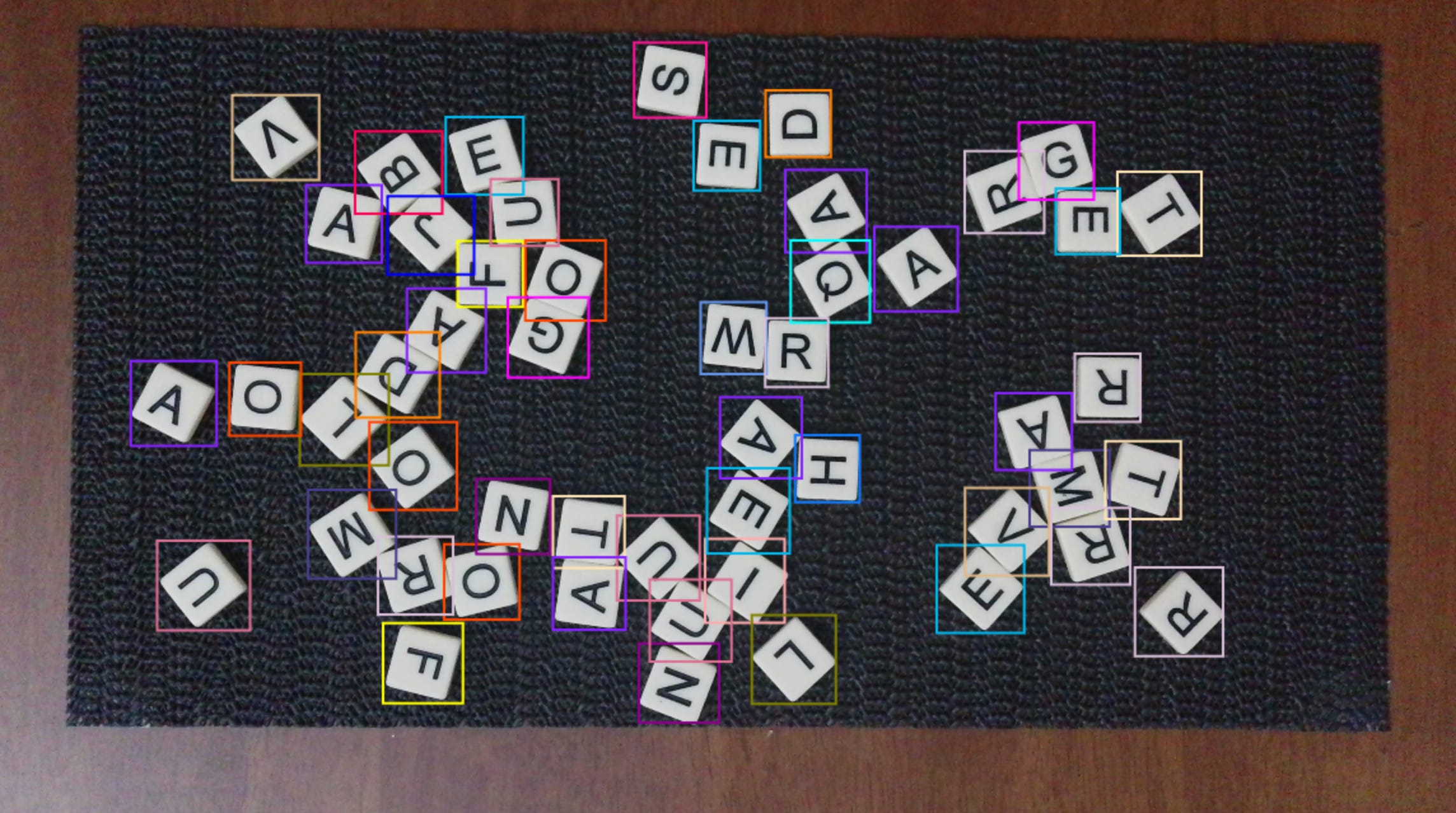
Both are small on purpose. You do not need a big model to find a tile and read a letter. And the one box I drew does the work for both of them: it is the crop the classifier trains on, and it is the box the detector learns to draw.
Why 99.1% became 11%
The or model was not bad. It was mismatched. It knew iPhone photos of tiles on a wood table, and the game camera renders the same tiles a different way, in MJPG, from a different angle. The letters never changed. What changed was how the camera saw them.
So why did a 99.1% model collapse to 11%? It is the question I keep coming back to, and the answer is the whole point of this post.
So the fix was a domain retrain. We took the same ResNet-50, and fine-tuned it from the old checkpoint on the new webcam crops, for 25 epochs.
The old weights keep the learned glyph shapes, and the new frames teach it our camera characteristics. The gate is 95% top-1 over all 26 classes, measured letter by letter.
The export trap
The ResNet-50 expects normalised input, but the DeepStream pipeline hands it raw pixels. So we bake the normalisation into the ONNX graph itself, and rebuild its TensorRT engine each time we retrain.
That is a trap worth knowing about. If you train a model in one place and deploy it in another, the pre-processing has to travel with the weights. By baking it into the graph, the model ships with its own pre-processing, and the engine is always built from the current graph, so the two can never drift apart.
What comes next
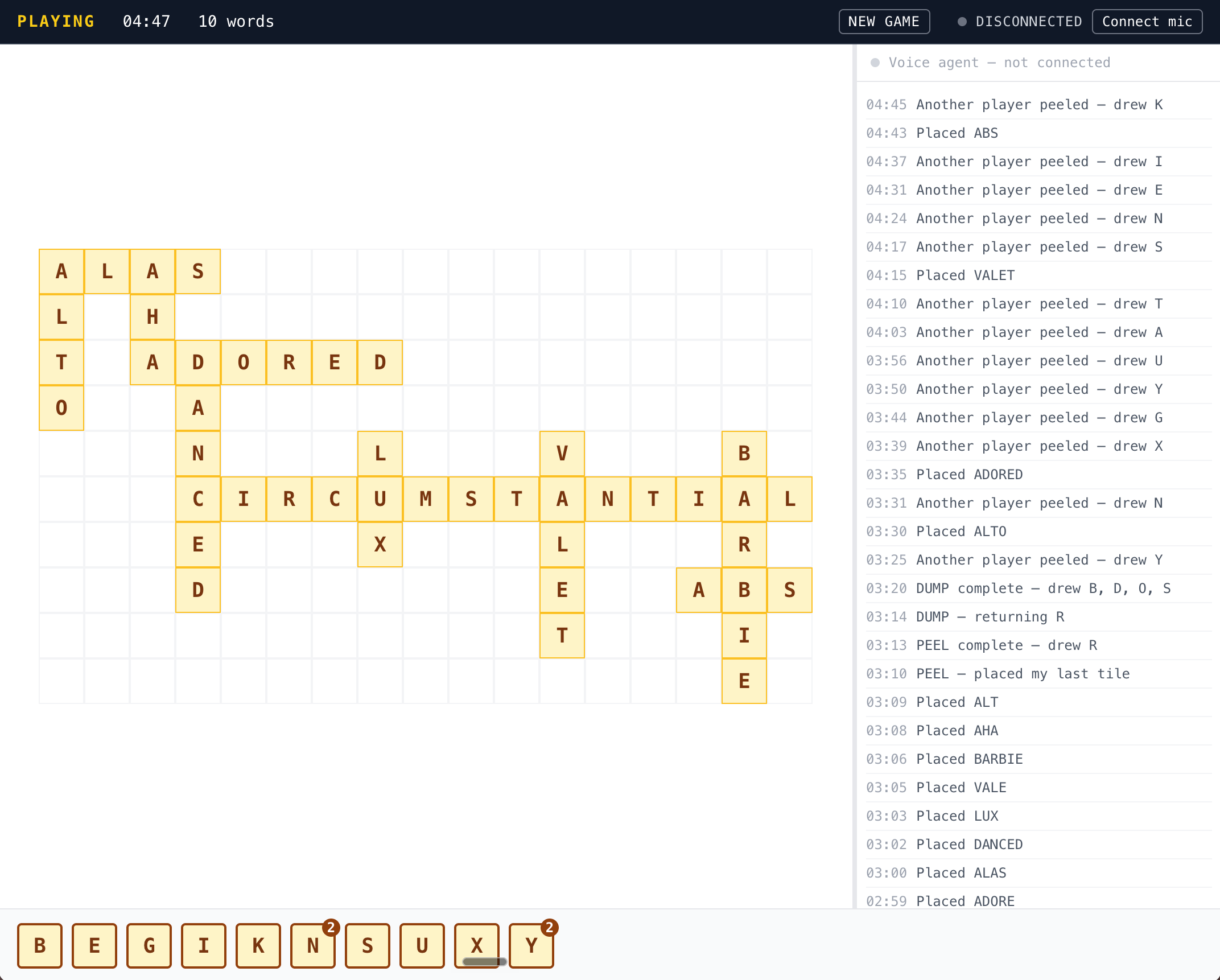
The bot can see now. However, it cannot yet play a full game, because we are still getting the camera stack ready and reliable enough for the DeepStream pipeline. So the next step is a simulator that emits exactly the frames the real pipeline will. The bot plays, solves, and talks against that in the meantime.
Till then,
JO